import pandas as pd
import numpy as np
import matplotlib.pyplot as plt
import requests, zipfile, io

from sklearn.model_selection import train_test_split, cross_val_score, GridSearchCV
from sklearn.tree import DecisionTreeRegressor
from sklearn.preprocessing import SplineTransformer
from xgboost import XGBRegressor, XGBClassifier
from sklearn.metrics import (accuracy_score, mean_squared_error, r2_score,
                              precision_score, recall_score, f1_score,
                              confusion_matrix, ConfusionMatrixDisplay)
import warnings
warnings.filterwarnings('ignore')JSC 370: Data Science II
Week 9: Feature Engineering, Hyperparameter Tuning, and Model Evaluation
Outline
- Part 1: Feature Engineering
- Part 2: Hyperparameter Tuning
- Part 3: Model Evaluation — Training, Validation, and Testing
- Part 4: Cross-Validation
Where We Are
- Last week: decision trees, random forests
- We saw some hyperparameter tuning
- Showed that train/test splits let us estimate real-world performance
This week we formalize:
- How to engineer features to improve model inputs
- How to tune hyperparameters systematically
- How to evaluate models honestly — split strategy and metrics
Setup
Data: Toronto Bike Share (Open Data)
We use the Toronto Open Data Bike Share Ridership dataset — individual trip records for 2023.
Loading the 2023 Ridership Data
This is a very large dataset! We will look at May–July 2023 to capture the peak cycling season.
for r in package["result"]["resources"]:
    if "2023" in r["name"]:
        url_2023 = r["url"]
        break

# Download ZIP and read May–July (months 5–7)
resp = requests.get(url_2023)
z = zipfile.ZipFile(io.BytesIO(resp.content))

csv_files = [f for f in z.namelist() if f.endswith('.csv')][4:6]
bike = pd.concat(
    [pd.read_csv(z.open(m), encoding='latin-1') for m in csv_files],
    ignore_index=True
)
print(f"Shape: {bike.shape}")
bike.head(3)
Shape: (1252908, 10)| Trip Id | Trip Duration | Start Station Id | Start Time | Start Station Name | End Station Id | End Time | End Station Name | Bike Id | User Type | |
|---|---|---|---|---|---|---|---|---|---|---|
| 0 | 21248733 | 344 | 7693 | 05/01/2023 00:00 | NaN | 7065.0 | 05/01/2023 00:06 | Dundas St E / Parliament St | 713 | Annual Member |
| 1 | 21248734 | 521 | 7418 | 05/01/2023 00:00 | College Park - Yonge St Entrance | 7248.0 | 05/01/2023 00:09 | Baldwin Ave / Spadina Ave - SMART | 1120 | Casual Member |
| 2 | 21248735 | 1143 | 7027 | 05/01/2023 00:01 | Beverley St / Dundas St W | 7279.0 | 05/01/2023 00:20 | Rosehill Ave / Avoca Ave - SMART | 2231 | Casual Member |
Part 1: Feature Engineering
Data preparation
We see there are several time variables and strings representing locations. Let’s start doing some data prep and cleaning for feature engineering.
bike.columns = (bike.columns
                    .str.strip()
                    .str.replace(r'\s+', '_', regex=True)
                    .str.lower())

# Parse datetime and extract temporal features
bike['start_time'] = pd.to_datetime(bike['start_time'])
bike['trip_duration_min'] = bike['trip_duration'] / 60
bike['hour']        = bike['start_time'].dt.hour
bike['day_of_week'] = bike['start_time'].dt.dayofweek   # 0=Mon, 6=Sun
bike['month']       = bike['start_time'].dt.month
bike['is_weekend']  = (bike['day_of_week'] >= 5).astype(int)
bike['is_member']   = (bike['user_type'] == 'Annual Member').astype(int)

# Keep only plausible trip durations
bike = bike[(bike['trip_duration_min'] >= 1) & (bike['trip_duration_min'] <= 120)]
print(f"Rows after filtering: {bike.shape[0]:,}")
print(f"Member rate: {bike['is_member'].mean():.1%}")
print(f"Unique start stations: {bike['start_station_id'].nunique()}")
Rows after filtering: 1,241,838
Member rate: 10.5%
Unique start stations: 675Joining Station Geospatial Data
We also see bike station information. Station locations are published via the public GBFS feed, which is separate from the ridership data
# Fetch station info (lat, lon, capacity) from the GBFS station feed
stations = pd.DataFrame(
    requests.get(
        'https://tor.publicbikesystem.net/ube/gbfs/v1/en/station_information'
    ).json()['data']['stations']
)[['station_id', 'lat', 'lon', 'capacity']]

stations['station_id'] = stations['station_id'].astype(int)

# Join to trip data on start_station_id
bike = bike.merge(stations, left_on='start_station_id', right_on='station_id', how='left')
print(f"Stations matched: {bike['lat'].notna().sum():,} / {len(bike):,}")
Stations matched: 1,165,103 / 1,241,838Distance from Downtown as a Feature
Raw lat/lon are correlated — distance from a reference point is often more informative
def haversine_km(lat1, lon1, lat2, lon2):
    """Great-circle distance in km between two points."""
    R = 6371
    dlat = np.radians(lat2 - lat1)
    dlon = np.radians(lon2 - lon1)
    a = (np.sin(dlat / 2) ** 2
         + np.cos(np.radians(lat1)) * np.cos(np.radians(lat2))
         * np.sin(dlon / 2) ** 2)
    return R * 2 * np.arcsin(np.sqrt(a))

# King & Bay intersection as downtown reference
DOWNTOWN_LAT, DOWNTOWN_LON = 43.6481, -79.3791
bike['dist_downtown_km'] = haversine_km(
    bike['lat'], bike['lon'], DOWNTOWN_LAT, DOWNTOWN_LON)

print(bike[['start_station_id', 'lat', 'lon',
            'capacity', 'dist_downtown_km']].head(4).round(3))
start_station_id lat lon capacity dist_downtown_km
0 7693 43.655 -79.375 23.0 0.828
1 7418 43.660 -79.383 25.0 1.343
2 7027 43.653 -79.393 31.0 1.264
3 7027 43.653 -79.393 31.0 1.264Summary of Toronto Bike Share Variables
| Variable | Source | Type | Role |
|---|---|---|---|
hour |
start_time |
Cyclical (0–23) | Predictor |
day_of_week |
start_time |
Cyclical (0–6) | Predictor |
month |
start_time |
Cyclical (1–12) | Predictor |
is_weekend |
start_time |
Binary | Predictor |
is_member |
user_type |
Binary | Predictor / Target (classification) |
trip_duration_min |
trip_duration |
Numeric (minutes) | Target (regression) |
lat, lon |
GBFS station feed | Numeric | Predictor |
capacity |
GBFS station feed | Numeric | Predictor |
dist_downtown_km |
Derived from lat/lon | Numeric | Predictor |
end_time |
Raw data | Datetime | Beware: Leakage |
end_station_id |
Raw data | ID | Only known at trip end |
Station Map: Duration and Member Rate
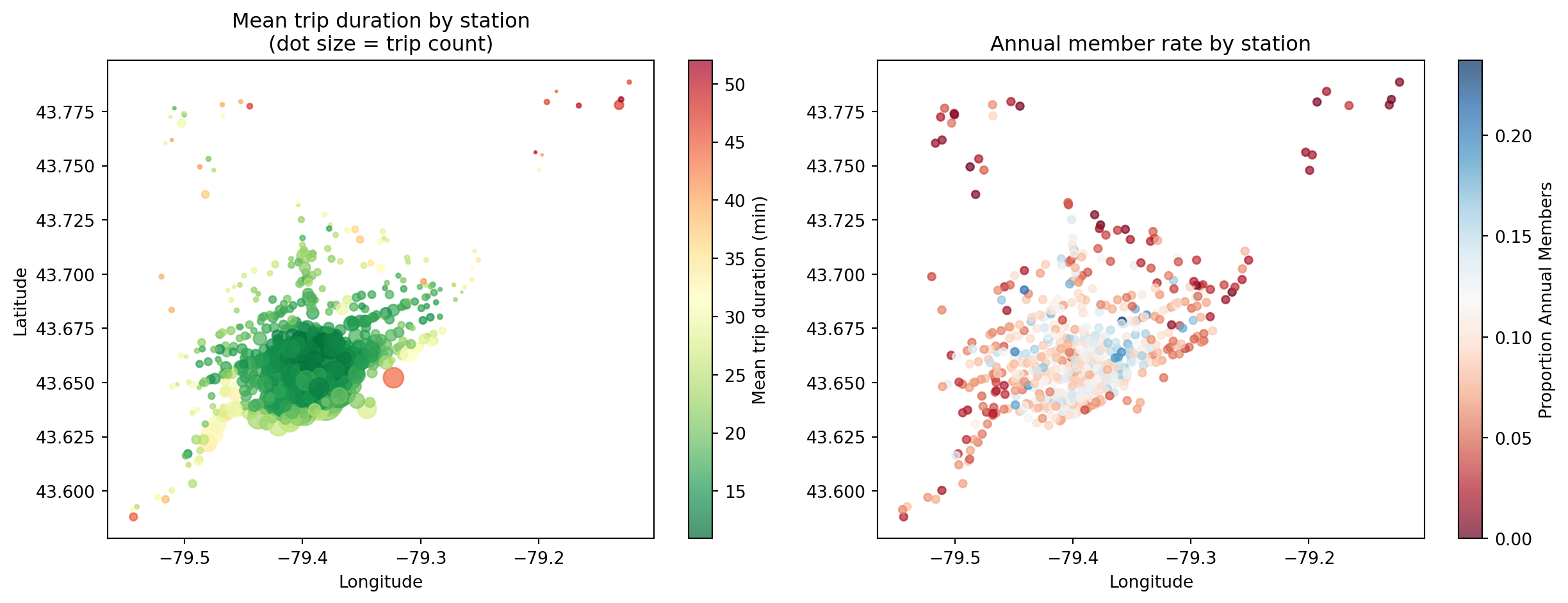
- Outer stations: longer trips, more casual users (recreational)
- Core stations: shorter trips, higher member rates (commuters)
Ridership Patterns
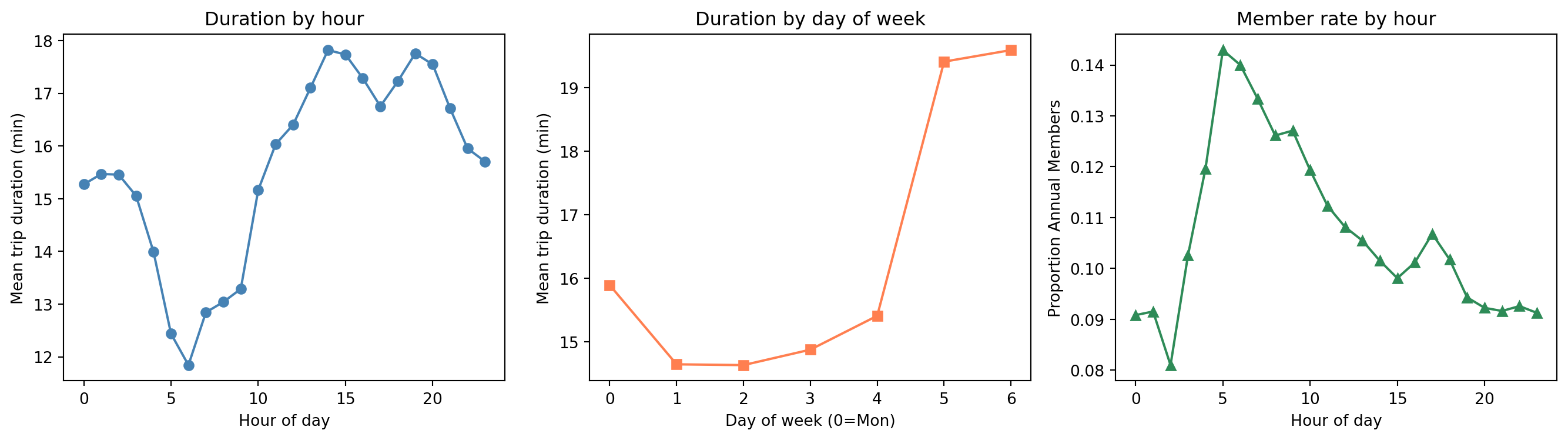
- Casual users take longer trips (recreation vs. commuting)
- Member rate spikes at commute hours (8-9am)
What is Feature Engineering?
- Feature engineering transforms raw data into inputs a model can learn from effectively
- Models only see numbers — everything must be encoded, scaled, or constructed appropriately
For the Toronto bike share data, each variable type needs different treatment:
| Variable type | Example | Treatment |
|---|---|---|
| Cyclical | hour, day_of_week, month |
Sin/cos or Fourier encoding |
| Binary | is_weekend, is_member |
No transformation needed |
| Continuous numeric | dist_downtown_km, capacity |
Use directly (or splines for non-linearity) |
| High-cardinality ID | start_station_id |
Drop — replaced by spatial features |
Data Leakage: Two Examples
Leakage rule: a predictor is only valid if it could be known at prediction time, before observing the outcome
Predicting trip duration
end_time= start_time + duration → directly reveals the targetend_station_id= only known after the trip ends
Why it matters
- Including
end_timewould give near-perfect R² - But at prediction time (when trip starts) we don’t have it
- Model would fail completely in deployment
The Problem with Raw Cyclical Features
hourranges from 0 to 23 — hour 23 and hour 0 are adjacent in time, but far apart numerically- A linear model or distance-based model sees them as very different
Hour:  0   1   2  ...  22  23  0   1  ...
Value: 0 1 2 ... 22 23 0 1 ... ← model sees a big jump at midnight- The same problem affects day of week (6 → 0) and month (12 → 1)
- One-hot encoding fixes the adjacency problem but loses the ordering information (the model no longer knows that hour 5 is between hours 4 and 6)
Solution: encode cyclical variables using sine and cosine transforms
Sine-Cosine Encoding for Cyclical Features
For a variable with period \(T\) (e.g., \(T = 24\) for hours, \(T = 12\) for months):
\[\sin\!\left(\frac{2\pi \cdot x}{T}\right), \quad \cos\!\left(\frac{2\pi \cdot x}{T}\right)\]
- This maps each value onto a circle — hour 23 and hour 0 are now close together
- Two columns preserve both ordering and wrap-around
bike['hour_sin']  = np.sin(2 * np.pi * bike['hour'] / 24)
bike['hour_cos']  = np.cos(2 * np.pi * bike['hour'] / 24)
bike['dow_sin']   = np.sin(2 * np.pi * bike['day_of_week'] / 7)
bike['dow_cos']   = np.cos(2 * np.pi * bike['day_of_week'] / 7)
bike['month_sin'] = np.sin(2 * np.pi * bike['month'] / 12)
bike['month_cos'] = np.cos(2 * np.pi * bike['month'] / 12)
print(bike[['hour', 'hour_sin', 'hour_cos']].head(6).round(3))
hour hour_sin hour_cos
0 0 0.0 1.0
1 0 0.0 1.0
2 0 0.0 1.0
3 0 0.0 1.0
4 0 0.0 1.0
5 0 0.0 1.0Visualizing Cyclical Encoding of Hour
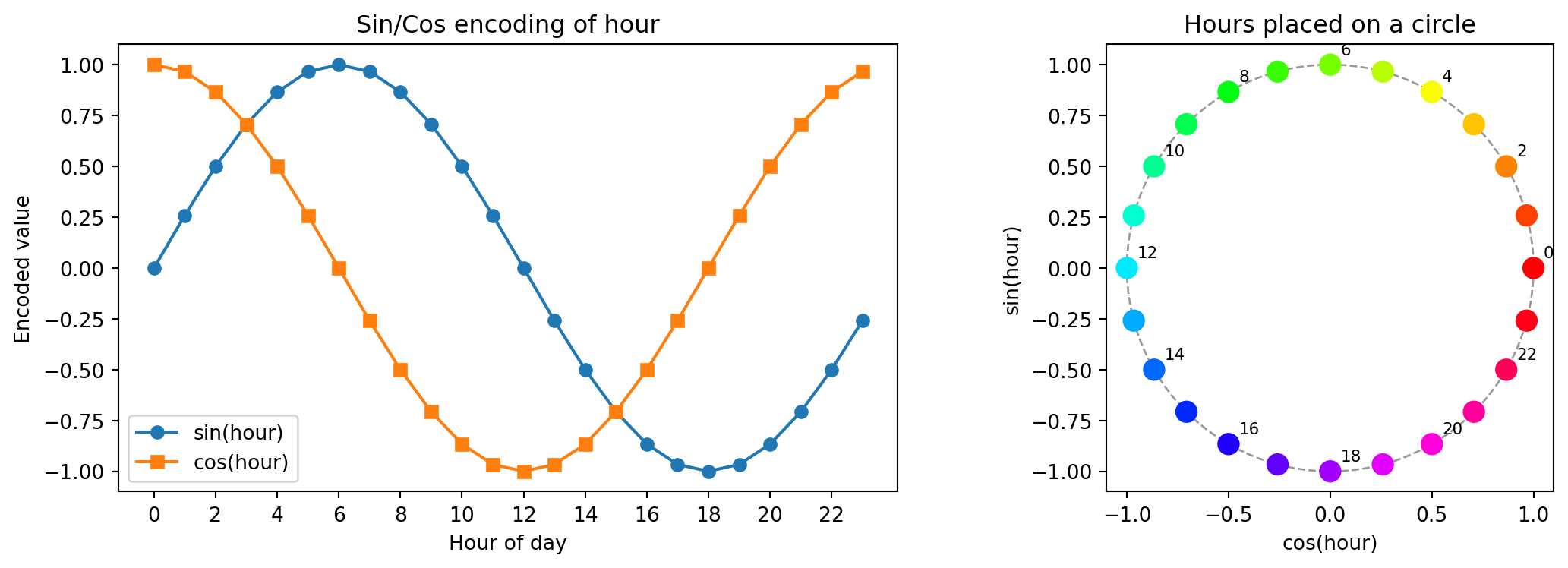
Hour 23 and hour 0 are now adjacent in the encoded space
Fourier Features for Capturing Multiple Harmonics
- A single sin/cos pair captures one frequency (one peak per cycle)
- The hourly member-rate pattern has two peaks (AM and PM commute) — one cycle per 12 hours
Add \(K\) harmonics for period \(T\):
\[\sin\!\left(\frac{2\pi k \cdot x}{T}\right), \; \cos\!\left(\frac{2\pi k \cdot x}{T}\right), \quad k = 1, 2, \dots, K\]
def fourier_features(series, period, n_harmonics, name):
    cols = {}
    for k in range(1, n_harmonics + 1):
        cols[f'{name}_sin_k{k}'] = np.sin(2 * np.pi * k * series / period)
        cols[f'{name}_cos_k{k}'] = np.cos(2 * np.pi * k * series / period)
    return pd.DataFrame(cols, index=series.index)

# 3 harmonics for hour (captures multiple peaks in the day)
hr_fourier = fourier_features(bike['hour'], period=24, n_harmonics=3, name='hr')
print(hr_fourier.head(3).round(3))
hr_sin_k1 hr_cos_k1 hr_sin_k2 hr_cos_k2 hr_sin_k3 hr_cos_k3
0 0.0 1.0 0.0 1.0 0.0 1.0
1 0.0 1.0 0.0 1.0 0.0 1.0
2 0.0 1.0 0.0 1.0 0.0 1.0Fourier Harmonics for the Daily Cycle
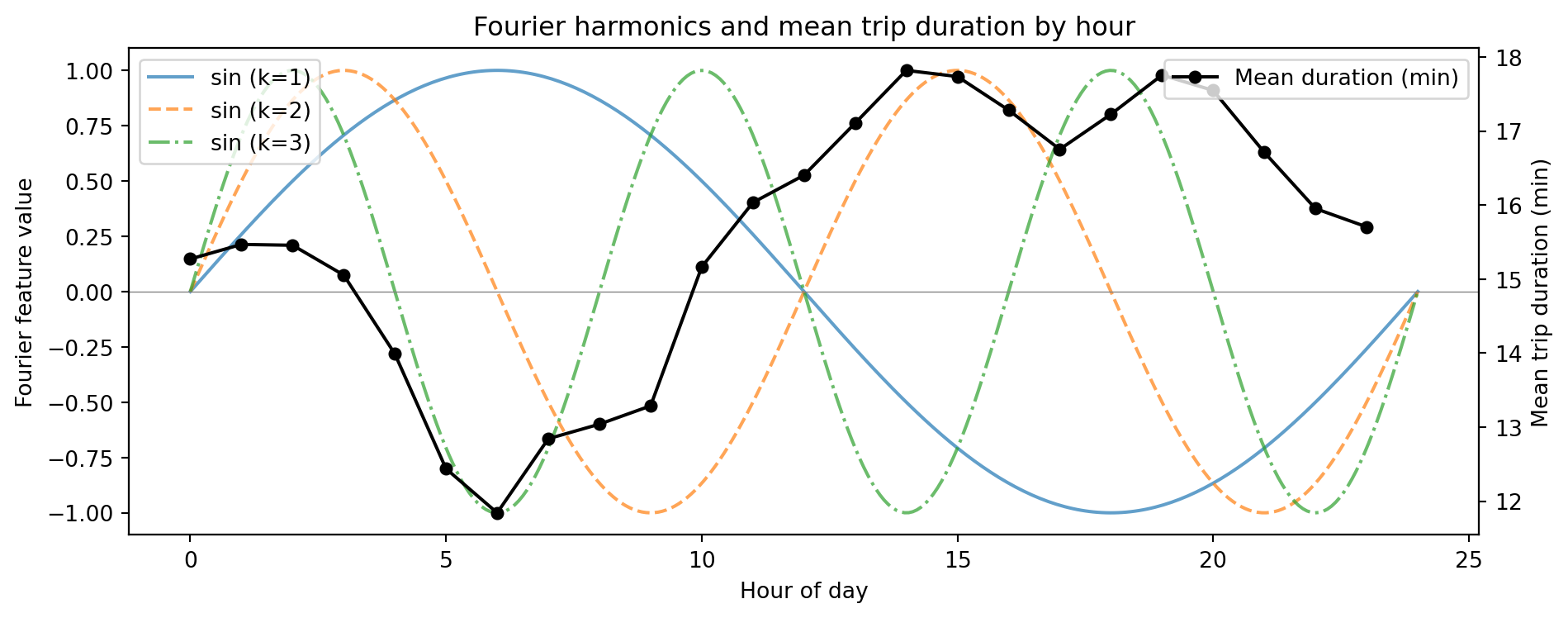
- \(k=1\): one cycle per day — misses the two-peak commute pattern
- \(k=2\): two cycles per day — captures AM/PM variation
- Higher harmonics add finer-grained structure
Splines for Smooth Non-Linear Effects
- Fourier features capture periodic patterns for known-period cyclical variables
- For general continuous predictors (e.g., temperature, humidity), use splines
We saw this earlier in the semester. Splines fit a piecewise polynomial, smooth at knot locations — flexible non-linear features
Input shape: (300, 1) → Spline features: (300, 6)degree=3: cubic spline — smooth first and second derivatives at each knotn_knots=5→ 7 basis columns, each active in a local region- Practical use:
dist_downtown_kmhas a non-linear relationship with trip duration — splines can capture this; weather variables (if joined from Environment Canada) are another good candidate
Visualizing Spline Basis Functions
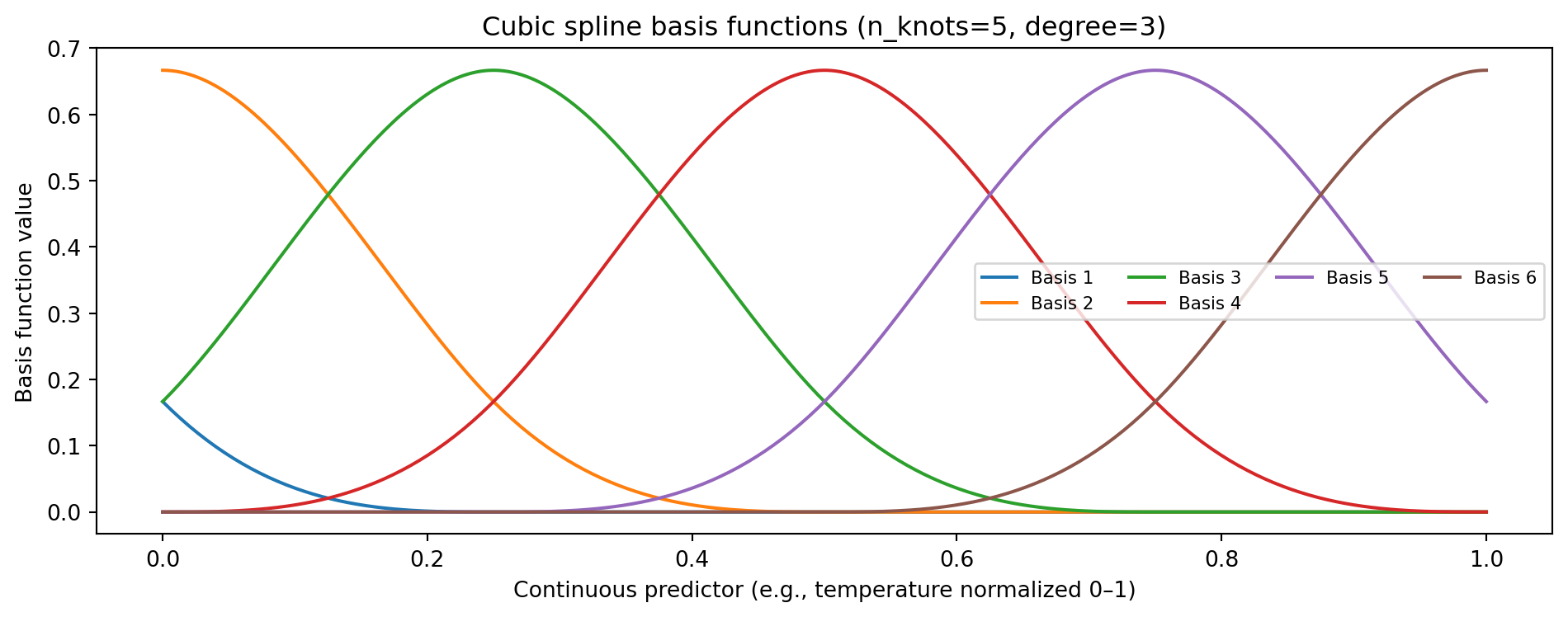
Each basis function is non-zero only locally — the model can assign different coefficients to each region
Fourier vs Splines
| Fourier features | Splines | |
|---|---|---|
| Best for | Known periodic patterns (hour, month, day_of_week) |
Smooth trends of any shape (temp, humidity) |
| Captures | Multiple harmonics of a fixed period | Local, flexible non-linearity |
| Key parameters | Period \(T\), harmonics \(K\) | Knots, degree |
| Extrapolation | Periodic — repeats outside training range | Can diverge outside range |
| Interpretability | Spectral / frequency decomposition | Piecewise polynomial |
In practice, combine them:
- Fourier features for
hour,day_of_week,month(known periods) - Splines for continuous predictors like
dist_downtown_km(non-linear effect on duration) - Binary flags for
is_weekend,is_member
Assembling the Full Feature Set
def build_features(df):
    out = pd.DataFrame(index=df.index)
    # Binary flags (no transformation needed)
    out['is_weekend'] = df['is_weekend']
    out['is_member']  = df['is_member']
    # Fourier features for cyclical variables
    for col, period, K in [('hour', 24, 3), ('day_of_week', 7, 2), ('month', 12, 2)]:
        for k in range(1, K + 1):
            out[f'{col}_sin_k{k}'] = np.sin(2 * np.pi * k * df[col] / period)
            out[f'{col}_cos_k{k}'] = np.cos(2 * np.pi * k * df[col] / period)
    # Spatial features from GBFS station join
    out['dist_downtown_km'] = df['dist_downtown_km']
    out['capacity']         = df['capacity']
    return out

X     = build_features(bike)
X_cls = X.drop(columns=['is_member'])  # is_member is the target for classification
y_reg = bike['trip_duration_min']      # regression target
y_cls = bike['is_member']              # classification target

print(f"Regression features:     {X.shape[1]}")
print(f"Classification features: {X_cls.shape[1]}")
Regression features: 18
Classification features: 17Feature Importance: How It’s Calculated in XGBoost
Every time a tree splits on feature \(j\), the reduction in impurity is recorded:
\[\Delta I_j = I(\text{parent}) - \frac{n_L}{n} I(\text{left}) - \frac{n_R}{n} I(\text{right})\]
- For regression: impurity = MSE → each split reduces prediction error
- For classification: impurity = Gini or entropy → each split improves class separation
- Feature importance = weighted average of \(\Delta I_j\) across all splits and all trees that used feature \(j\)
importance_type |
Meaning |
|---|---|
'gain' |
Average reduction in loss when feature is used (closest to MDI) |
'weight' |
Number of times feature appears in splits (default) |
'cover' |
Average number of samples covered by splits on this feature |
Fitting Models for Both Tasks
X_train,   X_test,   y_train,   y_test   = train_test_split(
    X,     y_reg, test_size=0.3, random_state=65)
X_train_c, X_test_c, y_train_c, y_test_c = train_test_split(
    X_cls, y_cls, test_size=0.3, random_state=65)

# Regression: predict trip duration (X includes is_member as a predictor)
xgb_reg = XGBRegressor(n_estimators=200, max_depth=5, learning_rate=0.1,
                        importance_type='gain', random_state=65, n_jobs=-1)
xgb_reg.fit(X_train, y_train)

# Classification: predict annual member vs casual (X_cls excludes is_member)
xgb_cls = XGBClassifier(n_estimators=200, max_depth=5, learning_rate=0.1,
                         importance_type='gain', random_state=65, n_jobs=-1)
xgb_cls.fit(X_train_c, y_train_c)

imp_reg = pd.Series(xgb_reg.feature_importances_, index=X.columns)
imp_cls = pd.Series(xgb_cls.feature_importances_, index=X_cls.columns)

# Test metrics — regression
y_pred_reg = xgb_reg.predict(X_test)
rmse = np.sqrt(mean_squared_error(y_test, y_pred_reg))
r2   = r2_score(y_test, y_pred_reg)
print(f"Regression     — RMSE: {rmse:.2f} min  | R²: {r2:.4f}")

# Test metrics — classification
y_pred_cls = xgb_cls.predict(X_test_c)
acc = accuracy_score(y_test_c, y_pred_cls)
f1  = f1_score(y_test_c, y_pred_cls)
print(f"Classification — Accuracy: {acc:.4f}  | F1: {f1:.4f}")

print("\nTop 3 (regression):", imp_reg.nlargest(3).round(3).to_dict())
print("Top 3 (classification):", imp_cls.nlargest(3).round(3).to_dict())
Regression — RMSE: 13.49 min | R²: 0.1354
Classification — Accuracy: 0.8946 | F1: 0.0000
Top 3 (regression): {'is_weekend': 0.3720000088214874, 'is_member': 0.17399999499320984, 'dist_downtown_km': 0.13899999856948853}
Top 3 (classification): {'month_sin_k1': 0.7540000081062317, 'is_weekend': 0.057999998331069946, 'hour_sin_k1': 0.029999999329447746}Feature Importance: Regression vs Classification
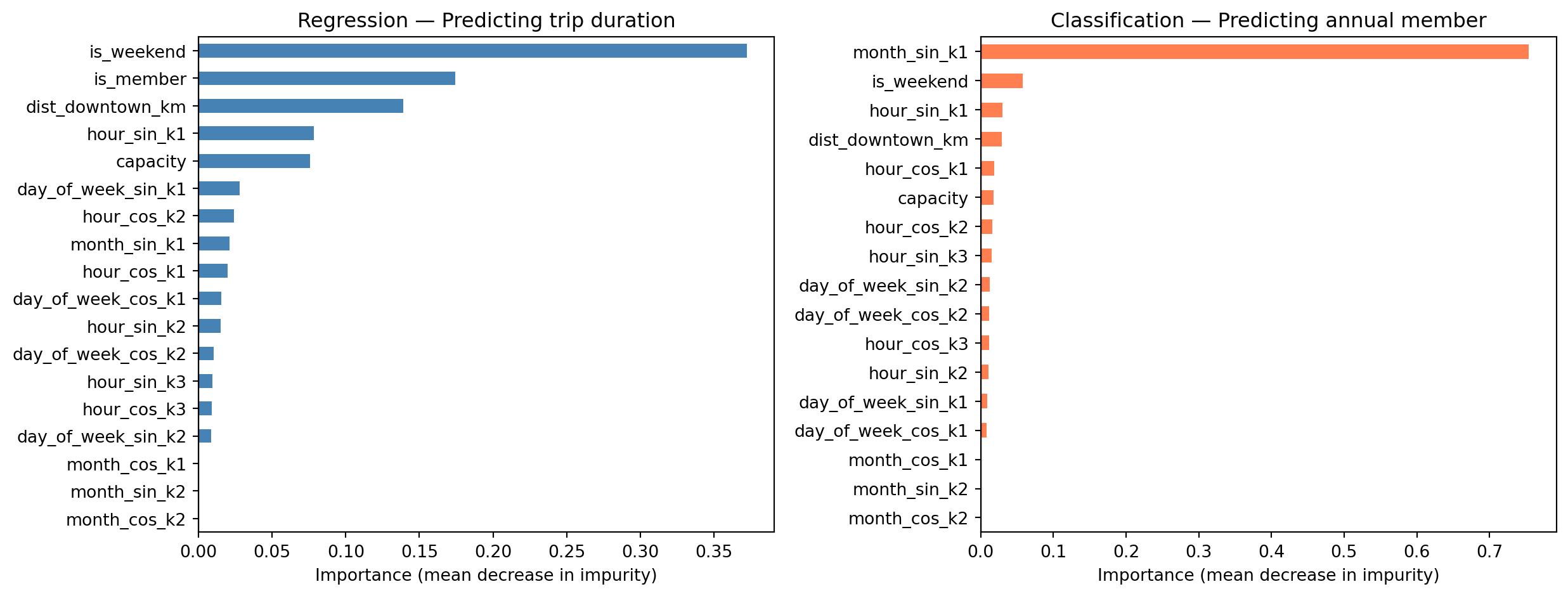
What the Importances Tell Us
Predicting trip duration (uses X, includes is_member)
is_weekend— longer leisure rides on weekendsis_member— casual users tend to ride longer; likely the strongest predictordist_downtown_km— outer stations generate longer trips- Hour-of-day harmonics — commuter vs. leisure timing
Predicting annual member (uses X_cls, is_member excluded)
monthandhourFourier features — commute-month patterns strongly distinguish membersis_weekend— casual users dominate weekendsdist_downtown_km— station distance from downtowncapacity— larger hubs skew toward members
However, the model performance is not great for either!
Part 2: Hyperparameter Tuning
Parameters vs Hyperparameters
| Parameters | Hyperparameters | |
|---|---|---|
| What | Learned from data | Set before training |
| Examples (XGBoost) | Tree split values, leaf weights | n_estimators, max_depth, learning_rate |
| How chosen | Optimization (minimize loss) | Search + validation |
- Parameters are what the model learns during
fit() - Hyperparameters control how the learning happens — not updated by optimization
XGBoost Regularized Objective
At each boosting round, XGBoost minimizes a penalized loss:
\[\mathcal{L} = \sum_i \ell(y_i, \hat{y}_i) + \sum_k \left[ \gamma T_k + \frac{1}{2}\lambda \|w_k\|^2 + \alpha \|w_k\|_1 \right]\]
| Parameter | Role | Effect | Default |
|---|---|---|---|
reg_lambda \((\lambda)\) |
L2 on leaf weights | Smooth shrinkage toward zero; reduces variance | 1 |
reg_alpha \((\alpha)\) |
L1 on leaf weights | Drives small weights to exactly zero; sparsity | 0 |
gamma \((\gamma)\) |
Min gain to split | Prunes splits that don’t reduce loss enough | 0 |
- L2 (
reg_lambda) is on by default — partly why XGBoost generalizes well out of the box - L1 (
reg_alpha) is useful when many features are present and only a few are expected to matter gammais a complementary handle on tree complexity alongsidemax_depth
The Bias-Variance Tradeoff
\[\text{Expected Test Error} = \text{Bias}^2 + \text{Variance} + \text{Irreducible Error}\]
- Bias: error from wrong assumptions — model too simple to capture the true pattern
- Variance: error from sensitivity to training data — model fits noise
- Irreducible error: noise in the data — no model can eliminate this
Hyperparameter tuning searches for the model complexity that minimizes test error
Bias-Variance: Boosting Rounds vs RMSE
Unlike a single tree, XGBoost adds trees sequentially — more rounds can overfit
xgb_bv = XGBRegressor(n_estimators=600, max_depth=5, learning_rate=0.1,
                       random_state=65, n_jobs=-1)
xgb_bv.fit(X_train, y_train)

n_rounds = list(range(10, 610, 10))
train_err, test_err = [], []
for n in n_rounds:
    tr = xgb_bv.predict(X_train, iteration_range=(0, n))
    te = xgb_bv.predict(X_test,  iteration_range=(0, n))
    train_err.append(np.sqrt(mean_squared_error(y_train, tr)))
    test_err.append(np.sqrt(mean_squared_error(y_test,  te)))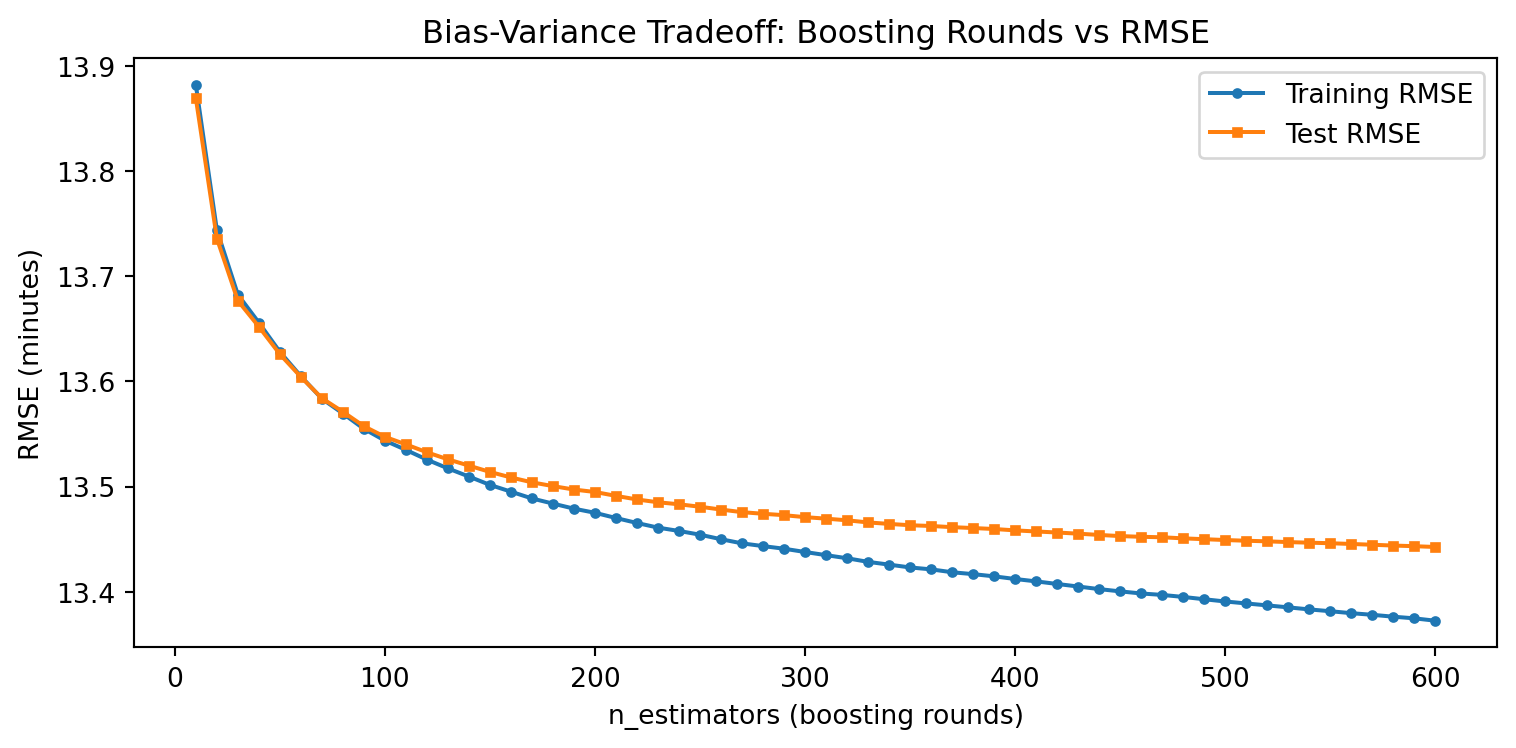
- Few rounds: high bias (underfitting)
- Too many rounds: training error keeps falling, test error rises (overfitting)
- Early stopping can automatically find the sweet spot
Hyperparameter Tuning with Cross-Validation
XGBoost has no OOB score — use 5-fold CV with random search when the grid is large
from sklearn.model_selection import RandomizedSearchCV

param_dist = {
    'max_depth':     [3, 5, 7],
    'learning_rate': [0.05, 0.1, 0.3],
    'reg_lambda':    [0.1, 1, 10],   # L2: smooth shrinkage
    'reg_alpha':     [0, 0.1, 1],    # L1: sparsity on leaf weights
}
xgb = XGBRegressor(n_estimators=250, random_state=65, n_jobs=-1)
rand_search = RandomizedSearchCV(xgb, param_dist, n_iter=20, cv=5,
                                 scoring='neg_root_mean_squared_error',
                                 random_state=65, n_jobs=-1)
rand_search.fit(X_train, y_train)
print("Best params:", rand_search.best_params_)
print(f"Best CV RMSE: {-rand_search.best_score_:.2f} minutes")- Full grid: \(3^4 = 81\) combinations × 5 folds = 405 fits — slow on large datasets
- Random search samples 20 random combinations × 5 folds = 100 fits — much faster
- For small datasets or few hyperparameters,
GridSearchCVis fine and exhaustive - Best params: {‘reg_lambda’: 10, ‘reg_alpha’: 0.1, ‘max_depth’: 7, ‘learning_rate’: 0.3}
Fit the Best Model
#best_params = rand_search.best_params_
#print("Best params:", best_params)

xgb_best = XGBRegressor(
    n_estimators=250,
    reg_lambda=10, reg_alpha=0.1, max_depth=7, learning_rate=0.3,
    random_state=65, n_jobs=-1
)
xgb_best.fit(X_train, y_train)
y_pred = xgb_best.predict(X_test)

print(f"Test RMSE: {np.sqrt(mean_squared_error(y_test, y_pred)):.2f} minutes")
print(f"Test R²:   {r2_score(y_test, y_pred):.4f}")
Test RMSE: 13.41 minutes
Test R²: 0.1466Early Stopping: Automatic Tuning of n_estimators
XGBoost can automatically stop adding trees when validation error stops improving
X_tr, X_val, y_tr, y_val = train_test_split(
    X_train, y_train, test_size=0.2, random_state=65)

xgb_es = XGBRegressor(
    n_estimators=2000, max_depth=5, learning_rate=0.05,
    early_stopping_rounds=50, random_state=65, n_jobs=-1
)
xgb_es.fit(X_tr, y_tr,
           eval_set=[(X_val, y_val)],
           verbose=False)
print(f"Best round: {xgb_es.best_iteration}")
print(f"Val RMSE: {xgb_es.best_score:.2f} minutes")- Set
n_estimatorsvery large; training stops after 50 rounds with no improvement - Efficient alternative to grid-searching
n_estimatorsseparately
Tuning Strategy Summary
| Method | When to use | Pros | Cons |
|---|---|---|---|
| Grid search + CV | Few hyperparameters | Exhaustive, unbiased | Expensive for large grids |
| Random search + CV | Many hyperparameters | Efficient, scales well | May miss optimal |
| Early stopping | XGBoost / LightGBM | Automatically tunes n_estimators |
Needs a validation set |
| OOB score | Random forests only | Free — no extra fitting | RF-specific |
- For XGBoost: use grid/random search for
max_depth+learning_rate; use early stopping forn_estimators - Always tune on training data — report final performance on the test set
Part 3: Model Evaluation
What Are We Predicting?
We use the Toronto Bike Share 2023 dataset throughout this lecture.
Regression task (this section):
- Target:
trip_duration_min— trip duration in minutes, filtered to 1–120 min - Features: temporal (hour, day of week, month via Fourier encoding), spatial (distance from downtown, station capacity), membership status (
is_member) - Question: How long will a trip take, given when and where it starts?
Classification task (later in this section):
- Target:
is_member— annual member (1) vs. casual rider (0) - Question: Can we identify member rides from trip characteristics alone?
The Three Roles of Data
| Role | Purpose | May influence model? |
|---|---|---|
| Training set | Fit model parameters | Yes — model learns from this |
| Validation set | Tune hyperparameters, select model | Yes — guides tuning decisions |
| Test set | Report final performance | No — evaluated once at the end |
- The test set is a lockbox — do not open it until the final model is chosen
- Using the test set to guide any decision inflates performance estimates
Train / Validation / Test Split
All data
├── Training set (60%)   → fit model parameters
├── Validation set (20%) → tune hyperparameters, select model
└── Test set (20%)       → final, unbiased evaluation (untouched until the end)
# First, hold out the test set
X_trainval, X_test, y_trainval, y_test = train_test_split(
X, y_reg, test_size=0.2, random_state=65
)
# Then split training from validation
X_train, X_val, y_train, y_val = train_test_split(
X_trainval, y_trainval, test_size=0.25, random_state=65
# 0.25 × 0.8 = 0.2 of original → 60 / 20 / 20 split
)
print(f"Train: {X_train.shape[0]:,} | Val: {X_val.shape[0]:,} | Test: {X_test.shape[0]:,}")Train: 745,102 | Val: 248,368 | Test: 248,368Fitting and Evaluating on the Split
Train on X_train, use X_val to confirm the model generalises, then retrain on X_trainval (train + val) before evaluating once on X_test:
# 1. Fit on training set
model_val = XGBRegressor(n_estimators=250, reg_lambda=10, reg_alpha=0.1,
                         max_depth=7, learning_rate=0.3,
                         random_state=65, n_jobs=-1)
model_val.fit(X_train, y_train)
val_rmse = np.sqrt(mean_squared_error(y_val, model_val.predict(X_val)))
print(f"Validation RMSE: {val_rmse:.2f} min")

# 2. Retrain on train + val, then evaluate on test (open the lockbox once)
model_final = XGBRegressor(n_estimators=250, reg_lambda=10, reg_alpha=0.1,
                            max_depth=7, learning_rate=0.3,
                            random_state=65, n_jobs=-1)
model_final.fit(X_trainval, y_trainval)
y_pred = model_final.predict(X_test)
test_rmse = np.sqrt(mean_squared_error(y_test, y_pred))
print(f"Test RMSE:       {test_rmse:.2f} min")
Validation RMSE: 13.40 min
Test RMSE: 13.38 minRegression Metrics
| Metric | Formula | Interpretation |
|---|---|---|
| RMSE | \(\sqrt{\frac{1}{n}\sum(y_i - \hat y_i)^2}\) | Error in same units as \(y\) |
| MAE | \(\frac{1}{n}\sum\|y_i - \hat y_i\|\) | Average absolute error (robust to outliers) |
| R² | \(1 - \frac{\sum(y_i - \hat y_i)^2}{\sum(y_i - \bar y)^2}\) | Proportion of variance explained |
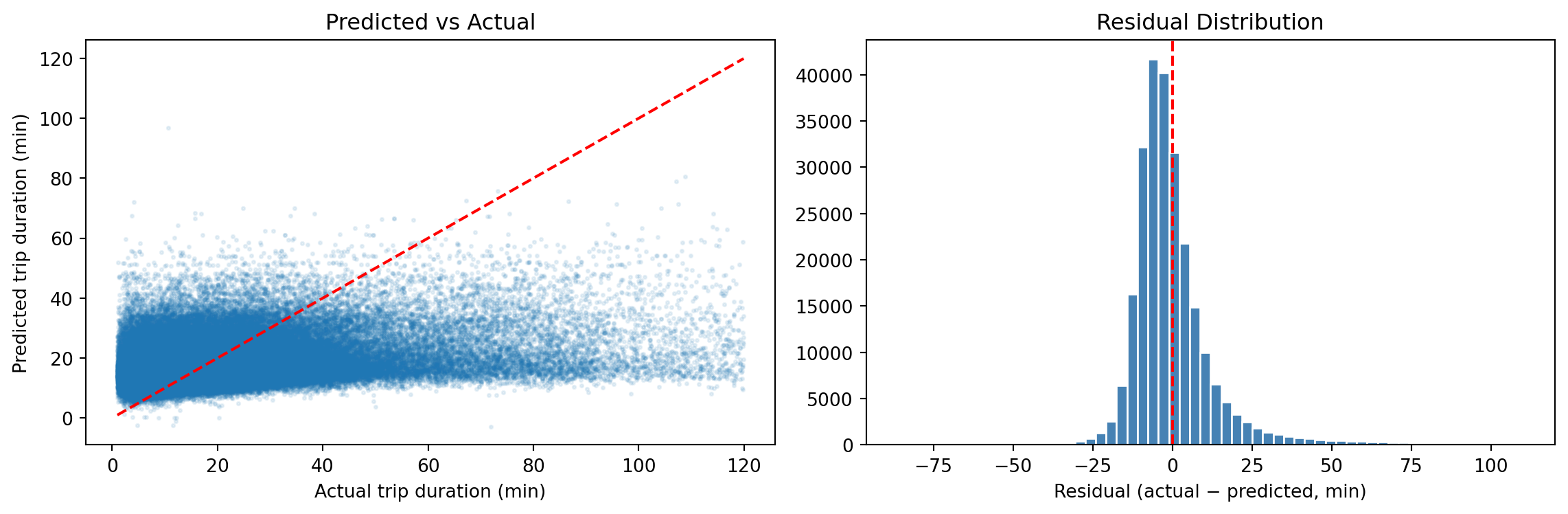
Residual Plot
Classification: Predicting Annual Member vs Casual
We can also predict user type — whether a rider is an annual member or a casual user
X_train_c, X_test_c, y_train_c, y_test_c = train_test_split(
    X_cls, y_cls, test_size=0.3, random_state=65)  # X_cls excludes is_member

# Class imbalance: members are the majority class
n_casual  = (y_train_c == 0).sum()
n_member  = (y_train_c == 1).sum()
spw = n_casual / n_member
print(f"Casual: {n_casual:,}  |  Member: {n_member:,}  |  scale_pos_weight: {spw:.2f}")
Casual: 777,807 | Member: 91,479 | scale_pos_weight: 8.50If the data has ~65% members, a naive model can achieve 65% accuracy by predicting “member” every time — accuracy alone is misleading. scale_pos_weight re-weights the loss so each class contributes equally:
\[\texttt{scale_pos_weight} = \frac{n_{\text{casual}}}{n_{\text{member}}}\]
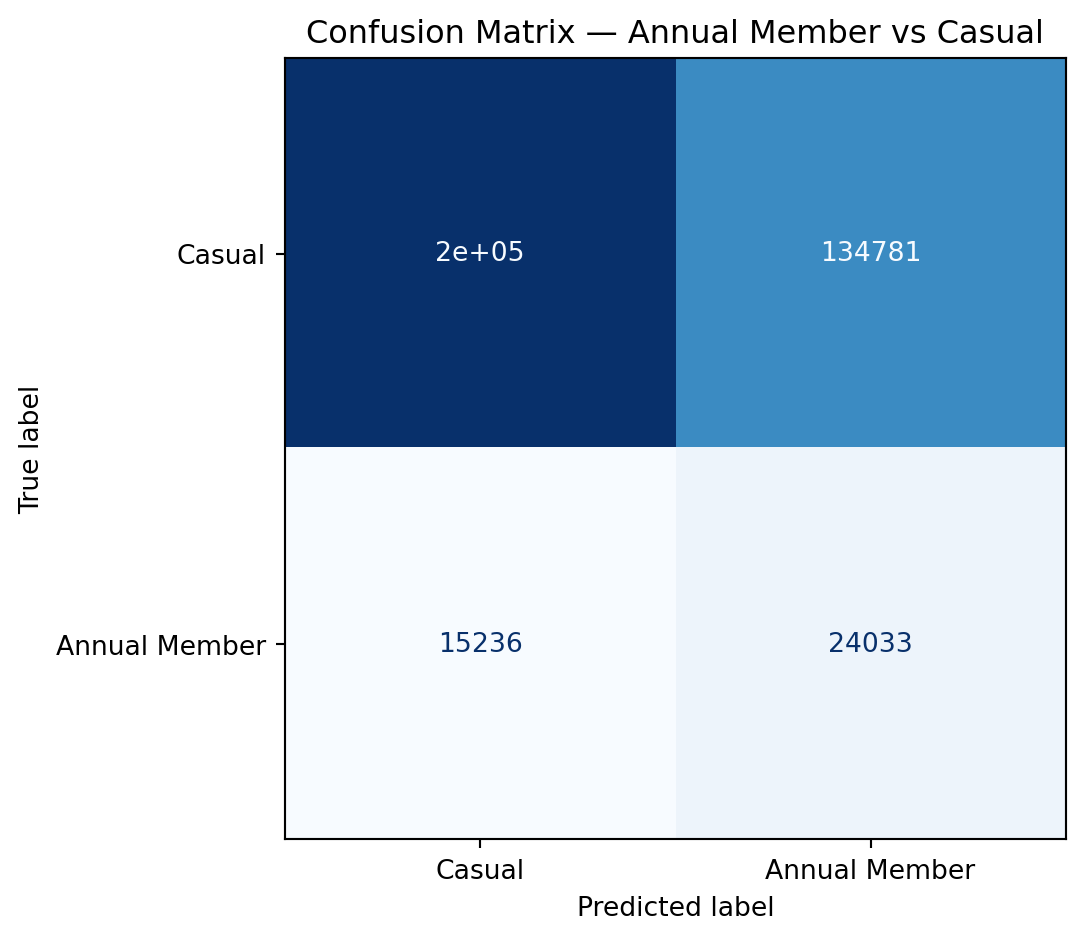
Classification Metrics Explained
| Predicted Member | Predicted Casual | |
|---|---|---|
| Actual Member | TP (true positive) | FN (false negative) |
| Actual Casual | FP (false positive) | TN (true negative) |
\[\text{Precision} = \frac{TP}{TP + FP} \qquad \text{Recall} = \frac{TP}{TP + FN} \qquad F1 = \frac{2 \cdot P \cdot R}{P + R}\]
- High precision, low recall: model is conservative — rarely predicts “Member” but usually correct when it does
- High recall, low precision: catches most members but many false alarms
- F1: harmonic mean — balances precision and recall
Confusion Matrix
Choosing the Right Metric
| Scenario | Recommended metric |
|---|---|
| Balanced classification | Accuracy or F1 |
| Imbalanced classification (rare event) | Precision, Recall, F1, AUC-ROC |
| Regression, large errors costly | RMSE |
| Regression, outliers present | MAE |
| Regression, explain variance | R² |
- Choose your metric before looking at results — changing metrics after seeing performance is a subtle form of overfitting
Part 4: Cross-Validation
The Problem with a Single Validation Set
- A single train/validation split introduces high variance in the performance estimate
- Results depend heavily on which observations end up in each set
Split 1: val = [obs 1, 5, 9, ...]   → RMSE = 8.4 min
Split 2: val = [obs 2, 6, 10, ...]  → RMSE = 7.9 min
Split 3: val = [obs 3, 7, 11, ...]  → RMSE = 8.8 min
Cross-validation averages over many splits to reduce this variance
\(k\)-Fold Cross-Validation
Data: [Fold 1] [Fold 2] [Fold 3] [Fold 4] [Fold 5]

Iter 1: TRAIN   TRAIN   TRAIN   TRAIN   [VAL  ]  → score₁
Iter 2: TRAIN   TRAIN   TRAIN   [VAL  ] TRAIN    → score₂
Iter 3: TRAIN   TRAIN   [VAL  ] TRAIN   TRAIN    → score₃
Iter 4: TRAIN   [VAL  ] TRAIN   TRAIN   TRAIN    → score₄
Iter 5: [VAL  ] TRAIN   TRAIN   TRAIN   TRAIN    → score₅

CV score = mean(score₁, …, score₅)- Every observation is used for both training and validation — just never at the same time
- Common choices: \(k = 5\) or \(k = 10\)
- Test set remains held out throughout
Cross-Validation in Python
xgb_cv = XGBRegressor(n_estimators=250, max_depth=5, learning_rate=0.1,
                       random_state=65, n_jobs=-1)
cv_scores = cross_val_score(xgb_cv, X_train, y_train, cv=5,
                             scoring='neg_root_mean_squared_error')
print(f"5-fold CV RMSE: {-cv_scores.mean():.2f} ± {cv_scores.std():.2f} minutes")
print(f"Individual folds: {(-cv_scores).round(2)}")
5-fold CV RMSE: 13.52 ± 0.04 minutes
Individual folds: [13.5 13.5 13.47 13.51 13.6 ]Leave-One-Out Cross-Validation (LOOCV)
- Extreme case of \(k\)-fold with \(k = n\): each fold contains a single observation
- Train on \(n - 1\) observations, validate on 1
\[\text{LOOCV Error} = \frac{1}{n} \sum_{i=1}^n \text{Error}_i\]
| LOOCV | 5-fold CV | |
|---|---|---|
| Bias | Very low (model sees nearly all data) | Slightly higher |
| Variance | High (single observation in each val set) | Lower |
| Computation | \(n\) model fits | 5 model fits |
| When to use | Very small datasets only | Standard recommendation |
In practice, 5- or 10-fold CV gives a better bias-variance tradeoff than LOOCV However, in bocked data settings, such as spatial and temporal data we sometimes do leave one site out (LOSO) or leave one time period out (LOTO) cross validation rather than LOOCV
Data Leakage and the Feature Engineering Pipeline
A correct workflow applies all transformations inside the train/test split:
scikit-learn Pipelines bundle preprocessing + model so that CV applies them correctly:
from sklearn.pipeline import Pipeline
pipe = Pipeline([
    ('spline', SplineTransformer(n_knots=5, degree=3)),
    ('model',  XGBRegressor(n_estimators=200, max_depth=5, random_state=65))
])
# Spline is fit only on training fold — no leakage
cv_pipe = cross_val_score(pipe, X_train[['hour']], y_train, cv=5,
                           scoring='neg_root_mean_squared_error')
print(f"CV RMSE with spline: {-cv_pipe.mean():.2f} minutes")
The Full ML Workflow
Understand the data — identify leakage variables (end_time, end_station_id)
Split data → train (70%) / test (30%)
Feature engineering (on training data only)
- Fourier features for hour, day_of_week, month
- Binary flags for is_weekend, is_member
- Spatial features: dist_downtown_km, capacity (from GBFS station join)
- (Optional: splines for dist_downtown_km; weather if joined from Environment Canada)
Hyperparameter tuning (5-fold CV on training data only)
- Grid search over max_depth in [3, 5, 7] and learning_rate in [0.05, 0.1, 0.3]
- Early stopping to find optimal n_estimators
Refit final model on full training set with best hyperparameters
Evaluate on test set (once)
- Regression (trip duration): RMSE, MAE, R²
- Classification (member type): accuracy, F1, confusion matrix
Interpret results — feature importance, residual plots
Summary
Feature Engineering
- Encode cyclicals with sin/cos or Fourier features (
hour,day_of_week,month) - Drop leakage variables (
end_time,end_station_id) before modelling - Use splines for smooth non-linear effects of continuous predictors (e.g., temperature)
- Always fit transformers on training data only
Hyperparameter Tuning
- Grid or random search + 5-fold CV on training data only; use random search when the grid is large
- Key XGBoost parameters:
| Parameter | Role | Default |
|---|---|---|
max_depth |
Tree complexity | 6 |
learning_rate |
Shrinkage per boosting step | 0.3 |
n_estimators |
Number of boosting rounds | 100 |
reg_lambda |
L2 penalty on leaf weights — reduces variance | 1 |
reg_alpha |
L1 penalty on leaf weights — encourages sparsity | 0 |
gamma |
Min loss reduction required to make a split | 0 |
- Use early stopping to efficiently tune
n_estimators; use random search for the rest
Model Evaluation
- Test set reveals true generalization — use it once
- Use CV on training data for tuning and model selection
- RMSE/R² for regression; F1/AUC for classification